How to export iPhone text messages for court: introducing TextBrief for Mac
Screenshots are the weakest way to put text messages in front of a judge. TextBrief turns an iPhone conversation into a sworn-affidavit-ready PDF exhibit with Bates or page numbers, original photos, a CSV and SHA-256 hashes, entirely on your Mac.
Almost every family, employment, landlord-tenant, small-claims and criminal file now turns on text messages at some point. A client forwards fifty screenshots, half of them cropped, none of them with a phone number, and someone has to turn that into an exhibit that will survive a cross-examination about whether it is complete.
We built TextBrief to make that part of the job take five minutes instead of an afternoon. It is a native Mac app that reads an iPhone, or a backup of one, and exports a single conversation as an exhibit-ready package: a court-formatted PDF, a spreadsheet of every message, the original photos, and a report proving where all of it came from.
This post explains how to export iPhone text messages for court with it, what the output looks like, and why each detail is there.
Why are screenshots a bad way to submit text messages as evidence?
Screenshots are what most people reach for, and they are the format most likely to cause a problem later.
- They lose the metadata. A screenshot shows "Mom" and "Tuesday", not a phone number and a timestamp to the second. Whoever relies on it has to fill those gaps with testimony.
- They are easy to attack as incomplete. A run of screenshots invites the question "what did you leave out?" There is no way to show from the images themselves that nothing between them was skipped.
- They hide edits and unsent messages. Since iOS 16, a sender can edit a message or unsend it. A screenshot shows the current state of the bubble; it doesn't reliably show that a message was changed, or that one was withdrawn.
- They are tedious at volume. A three-month dispute can be hundreds of messages. Scrolling, capturing, cropping and ordering that by hand is hours of work that produces a worse result.
Canadian law sets a low bar for authenticating electronic documents: under section 31.1 of the Canada Evidence Act the party relying on one must lead evidence "capable of supporting a finding" that it is what it purports to be, and the Ontario Court of Appeal confirmed in R. v. C.B., 2019 ONCA 380, that the threshold is low and can be met circumstantially. But clearing the admissibility threshold is not the same as persuading a judge, and weight is where incomplete screenshots get hurt. A complete, dated, hashed export takes that argument off the table before anyone makes it.
What is TextBrief?
TextBrief is a Mac app from maplelaw that exports iPhone iMessage and SMS conversations for court. It does three things:
- Reads the messages. Plug the iPhone in and back it up from the app, or open a backup that already exists from Finder or iTunes. Encrypted backups unlock with their backup password, on your Mac.
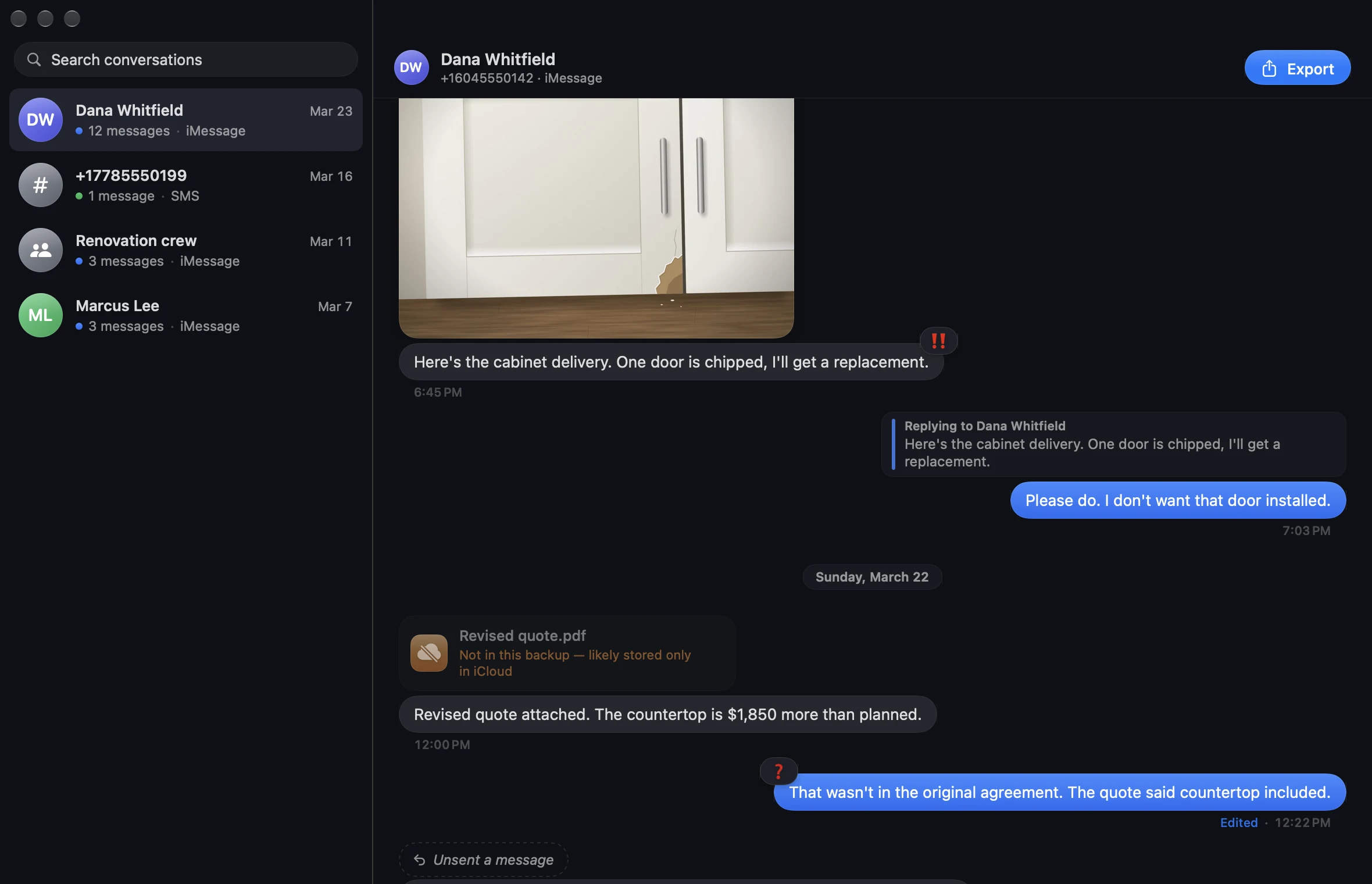
- Shows the conversation as it was recorded. Contact names, photos, reactions, replies, "Edited" markers and "Unsent a message" notices all appear the way the phone stored them.
- Exports an exhibit. Pick the conversation, choose a date range if you need one, label it, choose Bates or page numbers, and export.
How do you export iPhone text messages for court with TextBrief?
The whole workflow is a few minutes:
- Open TextBrief and connect the iPhone with a cable, then tap Trust on the phone. Click Back Up Now. If you already have a backup, use File → Open Backup Folder… instead.
- Enter the backup password if the backup is encrypted. That is the password set for "Encrypt local backup", not the phone's passcode. It is used once to unlock the backup and is never stored.
- Choose the conversation. Search by name or number. Scroll through it to confirm it is the right thread.
- Click Export and set the options:
- Period: all messages, or a date range.
- Page numbering: Bates numbers with your prefix (for example
WHIT000001), plain page numbers that start wherever your affidavit leaves off, or none. - Exhibit: label it "Exhibit A" and, if it will be attached to an affidavit, name the deponent so the cover carries the commissioner's jurat.
- Document: Letter or A4, the time zone every timestamp should use, and the matter name for the header.
- Choose a folder. TextBrief creates a new folder for the export with everything inside it.
That is it. There is no upload step, no account to create for the client, and nothing to install on the phone.
What does a court-ready text message export include?
Each export is a folder with four things in it.
1. The PDF transcript. An archival PDF/A document (the format courts and records offices use for long-term filing) with searchable text, the photos shown inline, and every message dated and timed to the second in the time zone you chose. Replies show what they replied to; reactions, edits and unsends appear as recorded rather than being tidied away.
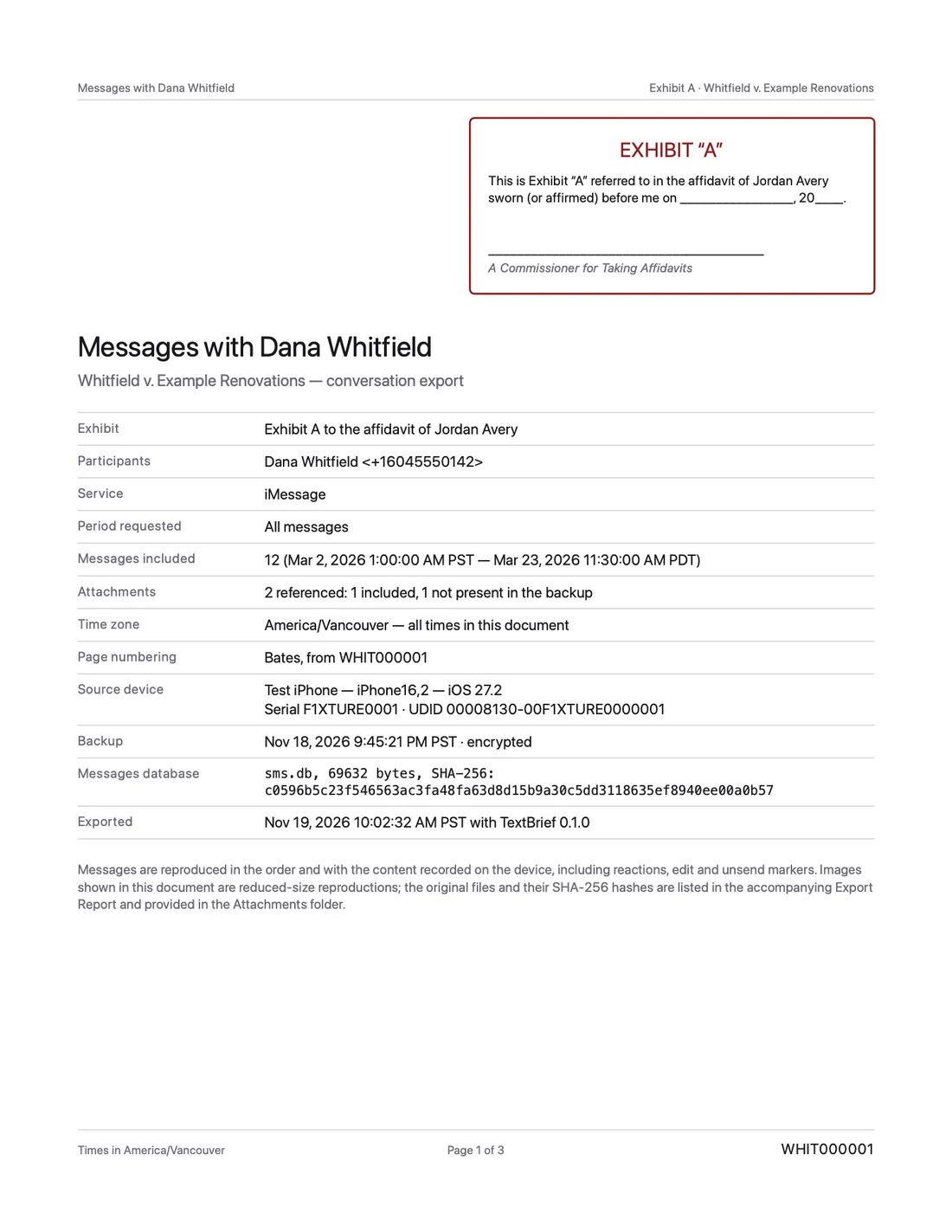
2. The cover page. Before the first message, the cover lists the participants and their numbers, the service (iMessage or SMS), the period requested, how many messages are included and the first and last timestamps, how many attachments were referenced and how many are actually present, the source iPhone's model, iOS version and serial number, the backup date, and the SHA-256 hash of the Messages database the export was read from.
3. A CSV of every message. One row per message with the sender and their number, the service, timestamps in your chosen time zone and in UTC, the text, attachments, reactions, what it replied to, whether it was edited or unsent, delivery and read status, and the Bates or page number where that message appears in the PDF. When the other side says "page 14", you can find it in a second; when you need to sort or count, it opens in Excel.
4. The original attachments and an export report. Photos and files are copied byte for byte from the backup, not re-compressed screenshots. The report lists the SHA-256 hash of the backup's manifest, the Messages database as stored and as read, every attachment, and every file the export wrote.
How does TextBrief handle affidavit exhibits?
This is where it differs most from general-purpose iPhone tools.
When a document is attached to an affidavit in a Canadian court, the person who takes the affidavit marks it as an exhibit: "This is Exhibit A referred to in the affidavit of … sworn before me on …", with a signature line for the commissioner. TextBrief prints that stamp on the cover, with the deponent's name filled in and the date and signature left blank for the commissioner. Every page header then says which exhibit it belongs to, so a page that comes loose from the bundle still identifies itself.
Numbering follows the same practice. If the affidavit runs to page 36, start the exhibit at page 37 and the numbering continues through the transcript. If the file uses Bates numbers, use your own prefix and starting number; the next export picks up where the last one stopped, so a series of exhibits stays in one continuous sequence.
One caution worth repeating: attaching a document to an affidavit does not prove the truth of what it says. As the Ontario Court of Appeal put it in Katz v. Katz, 2014 ONCA 606, a party cannot prove an exhibit's contents simply by referring to it in an affidavit. The affidavit still needs to say who sent the messages and how the deponent knows. What TextBrief does is make the document itself complete, legible and verifiable, so that the argument is about what the messages mean rather than whether they are real.
How does TextBrief help with authenticating text messages?
Authentication is about showing a document is what it claims to be. TextBrief records the facts you need to show that, at the moment of export:
- Where the messages came from. The source device's model, iOS version, serial number and UDID, and the date of the backup, all on the cover.
- That nothing changed afterwards. A SHA-256 hash is a fingerprint of a file: change a single character and the fingerprint changes completely. The report records hashes of the Messages database, each attachment and each output file. Anyone can re-compute them later and confirm the exhibit is the one that was exported. In United States federal courts, Rule 902(14) of the Federal Rules of Evidence treats data copied from an electronic device as self-authenticating when it is certified as identified by a process of digital identification, such as a hash value.
- That nothing was quietly dropped. If the phone offloaded a photo to iCloud, it isn't in the backup, so it can't be exported. TextBrief lists it in the PDF and the report as "not present in the backup" rather than skipping it, so the gap is documented instead of discovered by the other side.
- That the read itself didn't alter anything. The Messages database is opened read-only. Working copies of an encrypted backup are kept in a private folder on the Mac and deleted when you close it.
None of this decides admissibility. That is for the court. But it means the person swearing the affidavit, or the lawyer tendering it, can answer every "how do we know" question from the document itself.
Is it private? Are the messages uploaded anywhere?
No. TextBrief reads the iPhone or its backup directly on the Mac and writes the export to a folder you choose. Message content, photos and contact names are never sent to maplelaw or anyone else. The app only checks with maplelaw to confirm your licence, and that check carries your account, not your messages.
That matters for a lawyer for the obvious confidentiality reasons, and it matters for clients who are, understandably, nervous about handing their whole phone history to an online service in the middle of a custody dispute.
Who is TextBrief for?
- Family lawyers and their clients, where texts between parents are often the central record of parenting time, support and conduct.
- Litigators preparing affidavits in civil, employment, construction and landlord-tenant matters.
- Criminal defence counsel reviewing or tendering a client's own messages.
- Paralegals and law clerks who currently spend hours turning screenshots into exhibit books.
The usual pattern is simple: the client brings their iPhone (or their Mac with a backup on it) to the office, the firm exports the relevant conversations, and the client goes home with their phone untouched.
What do you need to use it?
- A Mac running macOS 14 Sonoma or later (Apple silicon or Intel).
- The iPhone and a cable, or a backup made by Finder or iTunes.
- The backup password, if the backup is encrypted.
- A licence to export: buy TextBrief once for US$39 and keep it, or use it with a maplelaw Pro or Max subscription, which also includes private legal AI and Canadian document storage. Downloading the app and browsing conversations is free. See pricing.
Download TextBrief for Mac and try it on your own phone first; you can browse every conversation before you buy.
Frequently asked questions
How do I export text messages from my iPhone for court?
Back up the iPhone to a Mac, open the backup in an export tool such as TextBrief, select the conversation and export it to PDF. For court use, choose a format that shows each message's date, time and sender's phone number, includes attachments, and records where the messages came from. TextBrief also adds an exhibit stamp, Bates or page numbers, a CSV and SHA-256 hashes.
Are screenshots of text messages admissible in court?
Often, yes. Canadian courts set a low threshold for authenticating electronic documents. But screenshots carry little metadata, are easy to challenge as incomplete, and can't show edits or unsent messages, so they tend to carry less weight than a complete export that shows dates, numbers and the source device.
Can TextBrief read an encrypted iPhone backup?
Yes. Enter the backup password, which is the one set for "Encrypt local backup" in Finder, not the phone's passcode. The password is used once to unlock the backup on your Mac and is not stored.
Does TextBrief upload my messages?
No. All reading and exporting happens on your Mac. The only network request is a licence check, which does not include any message content.
Can I number the pages to follow my affidavit?
Yes. Choose page numbers and set the starting page, for example page 37, or use Bates numbers with your own prefix. The next export continues the sequence.
What happens to photos that are only in iCloud?
If the iPhone offloaded a photo or file to iCloud, it is not in the backup. TextBrief lists it in the PDF and the export report as not present in the backup, so the gap is documented rather than hidden.
Does TextBrief work on Windows or with Android phones?
Not today. TextBrief is a Mac app for iPhone messages, and it reads the iPhone directly or a backup made by Finder or iTunes on a Mac.
Does an export make text messages admissible?
No tool can promise that; admissibility is for the court. TextBrief documents where the messages came from and fingerprints every file, which makes authenticity straightforward to establish and hard to dispute.