Searchable PDFs for text message evidence: why it matters, and how to check yours
Courts increasingly expect searchable PDFs, and a 400-message exhibit is only useful if you can find the message that matters. Here is what "searchable" really means for text-message exhibits, how to test a PDF in ten seconds, and why OCR on screenshots is a weak substitute.
A text-message exhibit tends to be long. A three-month dispute between a client and a contractor, an ex-spouse or an employer can easily run to several hundred messages and dozens of pages. Somewhere in there is the one message that matters: the date the deposit was confirmed, the moment someone admitted the cabinet was damaged, the threat that was later unsent.
Whether anyone can find that message quickly, the judge, opposing counsel or you at 11 p.m. the night before a hearing, depends on a detail most people never check: whether the PDF is searchable.
What does "searchable PDF" actually mean?
A PDF can hold words in two very different ways.
- As text. The file stores the actual characters, along with the font to draw them. You can press ⌘F or Ctrl+F and find a word, select a sentence, and paste it somewhere else exactly as written. This is what you get when a document is generated by software: a Word document saved as PDF, or a transcript exported directly from the source data.
- As an image. The file stores a picture that happens to show words. To the computer, a screenshot of a text conversation is the same as a photograph of a kitchen. There is nothing to search, select or copy.
The trap is that both look identical on screen. A folder of screenshots combined into one PDF looks like a perfectly respectable exhibit, right up until someone tries to search it.
Do Canadian courts require searchable PDFs?
Increasingly, yes, and the direction of travel is clear even where a specific rule does not yet apply to your file.
- Federal Court. The court's e-filing guidance requires that any typed text in filed documents be searchable.
- Federal Court of Appeal. Its e-filing guide says digital files should be searchable and recommends OCR for documents that are not.
- Supreme Court of British Columbia. Practice Direction 72, which governs electronic application records in the Associate Judges' chambers pilot, requires that all submitted documents be searchable.
- BC Court of Appeal. Its affidavit completion instructions require scanned exhibits to be run through OCR so they can be searched and copied.
- Ontario Superior Court of Justice. Hearing materials are uploaded to Case Center, where judges read them on screen, as the civil practice direction describes. A judge working through an electronic record is relying on search.
Rules change and vary by court, region and proceeding, so check the current practice direction for your file. But it is hard to find a Canadian court that would prefer an unsearchable exhibit.
Why a searchable exhibit helps your case, not just the court
Compliance is the floor. The practical benefits come every time someone works with the exhibit.
Finding things. Search the other party's phone number and every message they sent lights up. Search "$4,500" and you find the deposit. Search "sorry" and you find the apology that matters on liability. On a 40-page exhibit that is the difference between seconds and an hour.
Quoting accurately. An affidavit or factum quotes messages word for word. With a searchable exhibit you copy and paste. With images, someone retypes, and retyping is how a "not" goes missing or a date becomes the wrong date in a sworn document.
Review tools work. Litigation-support and document-review software indexes text. An exhibit made of images either gets skipped or has to be sent through OCR first.
It reads as complete. A transcript generated from the phone's own records, numbered message by message, invites fewer questions about what was left out than a run of cropped screenshots. Searchability is a side effect of producing the exhibit the right way.
How to check whether a PDF is searchable in ten seconds
You do not need special software. Open the PDF in Preview on a Mac, or in Adobe Acrobat or any browser, and try three things:
- Search for a word you can see on the page. Press ⌘F (Mac) or Ctrl+F (Windows). If it finds nothing, the page is an image.
- Try to select a single sentence. If the cursor draws a box over the whole page instead of highlighting words, it is an image.
- Copy and paste a phone number into a blank document. If the result is garbled, or the digits are slightly different from what you see, the text layer came from OCR and you should not trust it.
The third test matters more than it looks, for the reason below.
Why OCR on screenshots is a weak substitute
The usual fix for an image-only PDF is OCR, optical character recognition: software reads the picture and adds an invisible layer of text behind it. It makes the PDF searchable, and for a scanned letter it is fine. For text-message evidence it has three problems.
- It guesses, and the guesses fail on exactly the details that matter. OCR is good at ordinary words and worst at short, dense strings: phone numbers, times, dollar amounts. An "8" read as a "B", or a "1" as an "l", breaks the search you were relying on.
- The errors are invisible. The page still shows the right digits, because you are looking at the picture. The wrong digits sit in the hidden text layer, so a search for the phone number quietly misses that message, and nobody knows.
- It cannot recover what the screenshot never had. If the screenshot shows "Mom" and "Tue 9:41", OCR will faithfully make "Mom" and "Tue 9:41" searchable. The phone number, the full date and the seconds were never in the picture.
OCR is a reasonable repair for a scanned paper document. It is a poor way to build an exhibit when the original data is sitting on the phone.
How TextBrief makes text-message exhibits searchable
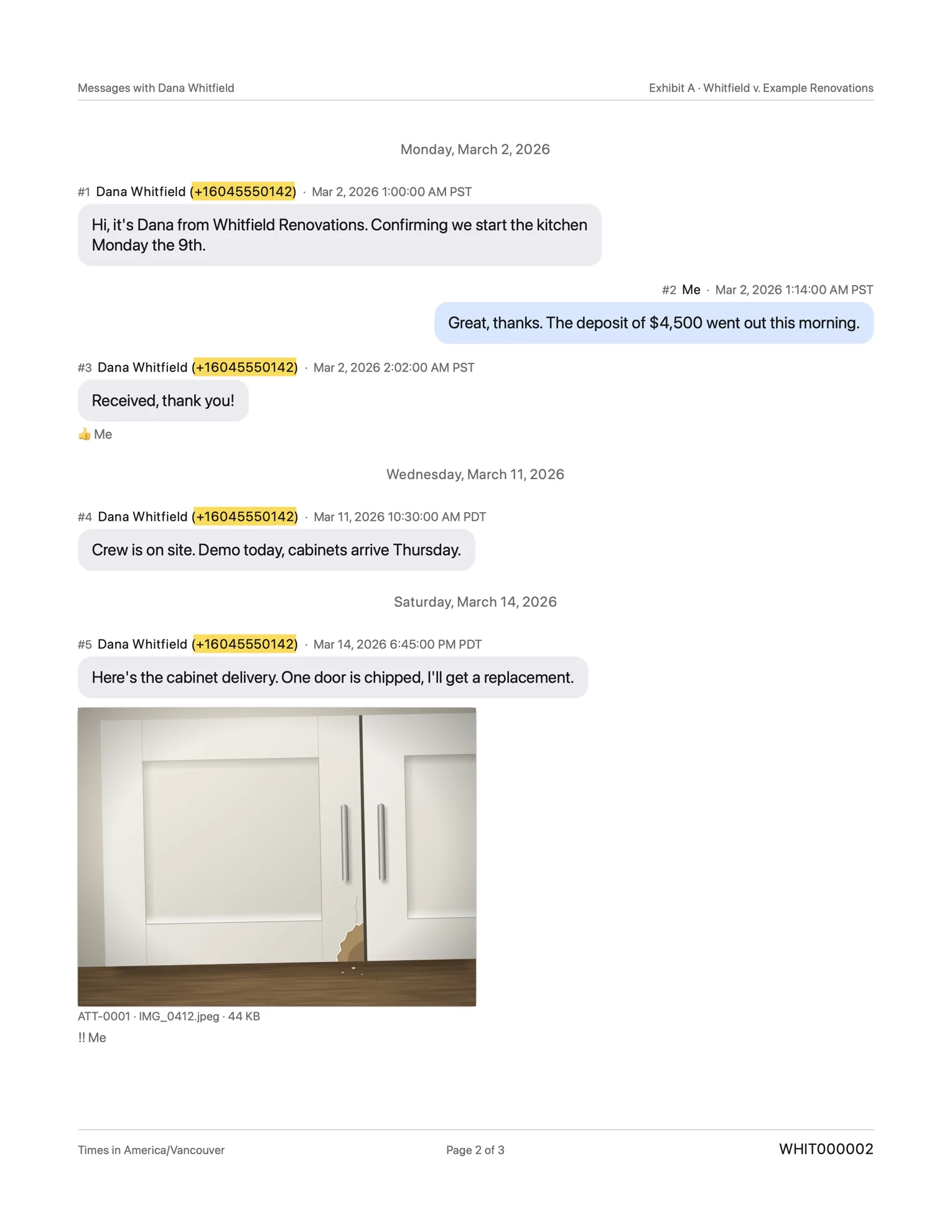
TextBrief does not photograph the conversation. It reads the iPhone's own Messages database, from the phone or from a Finder or iTunes backup, and typesets the transcript as a new document. Every piece of it is real text:
- Every message body, exactly as stored on the phone, including emoji and accented characters.
- The sender's name and phone number or email on every message, so a search for the number finds everything they sent.
- The full timestamp to the second, with the time zone, for example "Mar 14, 2026 6:45:00 PM PDT", so you can search by date.
- The message numbers (#1, #2…), the exhibit label and the Bates or page numbers, so "Exhibit A" or "WHIT000002" finds the right page.
The PDF is written to the PDF/A archival standard with its fonts embedded. It searches and displays the same way in Preview, Acrobat, a browser or Case Center, and will still do so years from now.
The export also includes a CSV, one row per message, for anyone who would rather sort and filter in a spreadsheet, plus a report with SHA-256 hashes of the source and every output file, so the searchable transcript can be tied back to the phone's records.
The one limit: text inside photos
If someone texted a photo of a receipt or a screenshot of an email, TextBrief includes that image exactly as it was sent, the original file, unaltered, which is what you want for evidence. It does not run OCR on it, so the words inside the picture are not searchable.
Each attachment is labelled in the transcript with an ID and its filename, such as "ATT-0001 · IMG_0412.jpeg", and the original file is in the export folder. If the contents of an image matter, describe them in the affidavit, or run OCR on that one image separately, knowing that the OCR text is an aid to finding it and not the evidence itself.
Frequently asked questions
Is a searchable PDF the same as a PDF/A? No. PDF/A is an archival standard that requires fonts to be embedded and the file to be self-contained. A PDF/A can still be image-only if it was made from scans. TextBrief's exports are both: PDF/A, and generated as real text.
Can I make my existing screenshots searchable? Adobe Acrobat Pro and similar tools can OCR them. Check the phone numbers and times by copying and pasting after OCR, and remember the screenshots still lack whatever was cropped out. If you still have the phone or a backup, exporting the conversation directly is more reliable.
Does searchability affect admissibility? Not directly. Authentication and admissibility turn on the evidence about where the messages came from. But a searchable, complete, numbered transcript is easier for the court to work with and harder to attack as selective, which goes to the weight it is given.
Does TextBrief upload my messages to make them searchable? No. The transcript is generated on your Mac. Messages, photos and contacts never leave it.
TextBrief is free to download and browse conversations; exporting needs a one-time licence or a maplelaw Pro or Max subscription. See how it works, or read how to export iPhone text messages for court for the full walkthrough.